Tag Archives: MS Access

Microsoft Access Database Compare Tool Retiring in June 2026

Microsoft has officially announced that the Database Compare tool for Microsoft Access will be retired in June 2026. For many Access developers, this isn’t just another deprecation it’s the loss of a genuinely useful, lightweight tool that filled an important gap in the development workflow.

Database Compare has long been a go-to utility for comparing schema changes, identifying differences across database objects, and supporting version control and deployment validation. It wasn’t flashy, but it was incredibly effective, a dependable, tool that just worked.

Sadly, because it wasn’t incorporated directly within Access I think many developers overlooked this little ‘hidden’ gem. If it had been a tool similar to FMS’ Total Access Detective, an add-in, I think it would have been a far more popular a tool.

For many developers, it became an essential part of day-to-day work. Losing it means losing a simple, no-cost solution that helped maintain quality and consistency across Access applications.
 
Continue reading

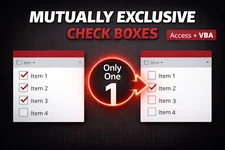
Mutually Exclusive Check Boxes in a Microsoft Access Continuous Form

A very common UI requests I hear from Microsoft Access developers goes something like this:

I have a continuous form with a check box, and only one record should be allowed to have it checked at a time.

Think :

  • Primary Phone
  • Default Address
  • Main Contact
  • Preferred Email
  • etc.

In a perfect world, we’d just use option buttons. But continuous forms don’t work that way where each record is rendered independently, so Access gives us many check boxes, not one logical group.

So how do we enforce mutual exclusivity?

Let’s walk through this step by step, starting with a straightforward After Update solution and progressively refining it into something cleaner, reusable, and faster. You pick the approach that suits your needs.
 
Continue reading

Is Microsoft Access Still a Good Business Solution in 2026?

For decades, Microsoft Access has held a unique place in the business software landscape, bridging the gap between spreadsheets and full-scale databases. It gave power users a way to build small, custom applications without needing a dedicated development team. As the business and software environments evolve, I am beginning to question whether Access continues to hold its value as a practical solution.

Access still offers undeniable strengths. It is an amazing RAD tool for developing complete solutions, integrates cleanly with other Microsoft products (less so now with the New Outlook and the web versions of Excel, Word, PowerPoint, … not supporting any direct VBA automation), and remains approachable for those without a programming background. I can quickly create prototypes, or even complete working solutions in some instances.
 
Continue reading

Microsoft Breaks Google and Outlook REST API Samples

Software Bug

I’ve recently noticed several reports about new problems with the legacy Web Browser control, issues like PDFs suddenly becoming inaccessible. Unfortunately, I can now confirm that a recent Microsoft update(s) have also affected my Google REST API and Outlook Graph API samples. The authentication form, which relies on the Web Browser control, no longer displays making it now impossible to authenticate and thus you can no longer actually interact with either REST API.

While Microsoft originally stated that the Web Browser control would remain fully supported through 2029, it’s becoming clear that this is no longer the case.

At this point, with all the ongoing issues, never ending bugs, now breaking of longstanding features/processes, one has to very seriously consider if Access is truly a viable business solution anymore.

Another One Bites The Dust

Randomly decided to look at the Feedback Portal today, and something just felt… off. After a bit of investigating, I finally put my finger on it.

Another one’s gone. Vanished without a trace, no notice, no status, no archive. Just that eerie emptiness where an idea used to be.

Continue reading

The Microsoft Access Dev. Team :: MIA?!

Has anyone else noticed the silence from the Microsoft Access Dev Team lately? It’s like a ghost town.

There haven’t been any roadmap updates, blog posts, MS365 release notes, or announcements in quite some time, and all the existing roadmap items are now well past their expected release dates. We’re nearing the six month mark of nothingness (maybe even more).

This continued lack of communication makes the product look stagnant again, and frankly, it shows a real lack of respect for end users. When Microsoft repeatedly misses roadmap timelines and fails to provide any status updates, it sends the message that the users who rely on Access every day just aren’t a priority.

Continue reading

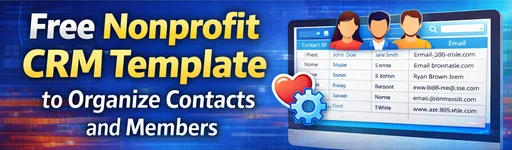
Free Nonprofit CRM Template to Organize Contacts and Members

Over the years, I’ve worked with several charities to help them get their data organized. One of the most common challenges they face is keeping track of their contacts, clients, and members in a clear and consistent way.

Many of these organizations, through no fault of their own, simply don’t have the resources or technical expertise to build a professional database solution. Instead, they often make do with a mix of spreadsheets, usually in Excel, stitched together to somewhat meet their day-to-day needs.

To make things a little easier, I’ve decided to share a simple, bare-bones sample database that can serve as a solid starting point. From here, new features and functionality can be added over time, but this foundation gives non-profits a reliable and well-structured beginning.
 
Continue reading

MS Access VBA – Not In List Event

The On Not in List event in Microsoft Access is triggered when a user types a value into a combo box that doesn’t currently exist in its list of available options if the Limit To List property (on the Data tab of the Property Sheet) is set to Yes. This event allows you to manage how the application responds, most commonly by offering the user a way to add the new value directly to the combo box’s data source which is most often a table.

For instance, imagine you have a combo box that lists available product categories from a Categories table. When a user enters a new category say, “Eco-Friendly” that isn’t already in the list, the Not In List event can prompt the user to confirm whether they’d like to add it. If they agree, your VBA code can insert the new category into the Categories table and then requery the combo box so that the new option appears immediately.
This approach helps maintain consistent data while giving users flexibility to expand predefined lists dynamically, improving workflow and usability.
 
Continue reading