Export\Salvage Your AWA Data

With Microsoft’s recent announcement of them pulling the plug on Acess Web Apps (AWAs) (this is NO way impacts the future of standard MS Access Desktop databases), see:

http://www.devhut.net/2017/03/27/steer-clear-of-access-web-applications-awa/

the question has become about how one can salvage the data from an AWA.  What means can we employ to export the tables so we don’t loose all our data.

Thankfully, George Hepworth has put together a very valuable tutorial on the subject:

Get Your Data From Your Expiring Access Web App

In his article, George presents 3 different possible ways to extract your Acess Web Apps (AWA) data:

  • Convert To Local Tables in Access
  • Create SharePoint Lists from your SQL Azure Tables
  • Deploy a dacpac (for SQL Server 2008 R2+)

So if you are looking for information on how to extract your raw data from your AWA, please take a look at his article!

VBA Zip/Unzip/Compress/Extract

The following was built out of personal need to add the ability to compress files within a project I was working on and thought it might serve others.

I built my example around 7-Zip, specifically its command line executable (7za.exe).  Simply visit their website and download the latest copy and then place the 7za.exe in a subfolder of the current database (it does not require any installation!, just copy/paste).  Then edit the s7ZipDir variable in the code below to reflect your setup and use the code.

There are usage examples provided with each function.

For Zipping, you can call the Zip function for multiple files on the same archive to add them to the same archive, but you must wait for the previous file to have finished being compressed prior to trying to add another one.

'***************************************************************************************
'7-Zip is licensed under the GNU LGPL license
'
'7-Zip Home (downloads, source code, ...)
'*****************************************
'   http://www.7-zip.org/
'***************************************************************************************

Private Const sModName = "mod_7-Zip_CmdLine" 'Application.VBE.ActiveCodePane.CodeModule
Private Const s7ZipDir = "\Libraries\7-Zip\" 'This is where we place a copy of the 7za.exe
                                             '(a subfolder of the location of the current database


'---------------------------------------------------------------------------------------
' Procedure : Zip_ZipFile
' Author    : Daniel Pineault, CARDA Consultants Inc.
' Website   : http://www.cardaconsultants.com
' Purpose   : Add a File to a Zip file
'               If the Zip file does not exist, it will be created
'               If it already exists then the file will be added to the existing Zip file
' Copyright : The following may be altered and reused as you wish so long as the
'             copyright notice is left unchanged (including Author, Website and
'             Copyright).  It may not be sold/resold or reposted on other sites (links
'             back to this site are allowed).
' Req'd Refs: None required
'
' Input Variables:
' ~~~~~~~~~~~~~~~~
' sFile      File to zip, fully qualified path and filename with extension
' sZipFile   Zip Archive, fully qualified path and filename with extension
' bDelsFile  Whether to delete the file to zip once added to the Zip Archive
' sPwd       Password to encrypt the file with
'
' Usage:
' ~~~~~~
' Zip_ZipFile "C:\Databases\Testing\Database7.accdb", "C:\Databases\Testing\Database7.zip"
'
' Revision History:
' Rev       Date(yyyy/mm/dd)        Description
' **************************************************************************************
' 1         2017-04-05              Initial Release
'---------------------------------------------------------------------------------------
Public Function Zip_ZipFile(ByVal sFile As String, _
                            ByVal sZipFile As String, _
                            Optional bDelsFile As Boolean = False, _
                            Optional ByVal sPwd As Variant)
    On Error GoTo Error_Handler
    Dim sExePath              As String
    Dim sShellCmd             As String

    'Location of our command line 7-zip exe
    sExePath = Application.CurrentProject.Path & s7ZipDir
    '7-zip command
    ' " -mx7" is used to specify maximum compression.
    sShellCmd = "7za.exe a -tzip" & _
                " " & Chr(34) & sZipFile & Chr(34) & _
                " " & Chr(34) & sFile & Chr(34) & " -mx7"
    'Additional deletion command (if applicable)
    If bDelsFile = True Then sShellCmd = sShellCmd & " -sdel"
    If IsNull(sPwd) = False Then sShellCmd = sShellCmd & " -p" & sPwd
    Shell sExePath & sShellCmd

Error_Handler_Exit:
    On Error Resume Next
    Exit Function

Error_Handler:
    'LogError Err.Number, Err.Description, sModName & "\Zip_ZipFile", , True, Erl
    MsgBox "The following error has occurred" & vbCrLf & vbCrLf & _
           "Error Number: " & Err.Number & vbCrLf & _
           "Error Source: " & sModName & "\Zip_ZipFile" & vbCrLf & _
           "Error Description: " & Err.Description & _
           Switch(Erl = 0, "", Erl <> 0, vbCrLf & "Line No: " & Erl) _
           , vbOKOnly + vbCritical, "An Error has Occurred!"
    Resume Error_Handler_Exit
End Function

'---------------------------------------------------------------------------------------
' Procedure : Zip_UnZipFile
' Author    : Daniel Pineault, CARDA Consultants Inc.
' Website   : http://www.cardaconsultants.com
' Purpose   : Unzip/extract the contents of a Zip archive to a designated directory
' Copyright : The following may be altered and reused as you wish so long as the
'             copyright notice is left unchanged (including Author, Website and
'             Copyright).  It may not be sold/resold or reposted on other sites (links
'             back to this site are allowed).
' Req'd Refs: None required
'
' Input Variables:
' ~~~~~~~~~~~~~~~~
' sZipFile   Zip Archive, fully qualified path and filename with extension
' sDestDir   Folder in which the extract the Zip archive's content
'
' Usage:
' ~~~~~~
' Zip_UnZipFile "C:\Databases\Testing\Database7.zip", "C:\Databases\Testing\"
'
' Revision History:
' Rev       Date(yyyy/mm/dd)        Description
' **************************************************************************************
' 1         2017-04-05              Initial Release
'---------------------------------------------------------------------------------------
Public Function Zip_UnZipFile(ByVal sZipFile As String, ByVal sDestDir As String)
    On Error GoTo Error_Handler
    Dim sExePath              As String
    Dim sShellCmd             As String

    'Location of our command line 7-zip exe
    sExePath = Application.CurrentProject.Path & s7ZipDir
    '7-zip command
    sShellCmd = "7za.exe x" & _
                " " & Chr(34) & sZipFile & Chr(34) & _
                " -o" & Chr(34) & sDestDir & Chr(34)
    Shell sExePath & sShellCmd

Error_Handler_Exit:
    On Error Resume Next
    Exit Function

Error_Handler:
    'LogError Err.Number, Err.Description, sModName & "\Zip_ZipFile", , True, Erl
    MsgBox "The following error has occurred" & vbCrLf & vbCrLf & _
           "Error Number: " & Err.Number & vbCrLf & _
           "Error Source: " & sModName & "\Zip_UnZipFile" & vbCrLf & _
           "Error Description: " & Err.Description & _
           Switch(Erl = 0, "", Erl <> 0, vbCrLf & "Line No: " & Erl) _
           , vbOKOnly + vbCritical, "An Error has Occurred!"
    Resume Error_Handler_Exit
End Function


Great Access Tools – Find and Replace

Important Update
Since the closure of UtterAccess’s site, this download is no longer available! Furthermore, since UtterAccess’ downloads where behind a login, we cannot utilize the Wayback Archive to retrieve copies!

Ever wanted to change a field name but have no clue what objects use it?

Historically developers turned towards tools like:

  • Speed Ferret (last updated for Access 2002 and I don’t think the company is issuing licenses anymore)
  • Rick Fisher’s Find and Replace (as noted below by John Colby, apparently Rick Fisher passed away, another great loss to the Access community!)

So what are our options now!?

Thankfully, Brent Spaulding (aka datAdrenaline) created the Search for Text utility which can be found in the UtterAccess.com Code Archive forum (along with many other little gems!).

Continue reading

Steer clear of Access Web Applications (AWA)

Microsoft Access Web Applications (AWAs) are Dead!

AWAs are going the way of the Dodos Microsoft has just announced!

In their recent post Updating the Access Services in SharePoint Roadmap, from the Office Retirement Blog, Microsoft states formally:

We no longer recommend Access Services for new apps. This feature will be retired from Office 365. We will stop creation of new Access-based apps in SharePoint Online starting June 2017 and shut down any remaining apps by April 2018

So the writing is on the wall, steer clear of developing any new AWAs and look into migrating your existing data prior to the deadline so as to not loose it.

This won’t come as a terrible surprise to many as Microsoft hadn’t invested in any new features in quite some time and had by appearance abandoned it over a year ago.  That said, just when we finally thought we were moving forward with a web solution, Microsoft, once again, pulls the rug from right under our feet!  Sad, but not surprising as this was their 3rd failed attempt at porting Access to a WAN environment:

  • Data Access Pages
  • Access web databases
  • Access web apps

Does anyone else feel the BETA Burn?!

It is just sad to see Microsoft’s lack of engagement with their own products that they continue to walk away from products, time after time, rather than completing them properly.  They finally were heading down the right path, but once again never finished the product, never added the features that people were requesting!  They keep ignoring the feedback provided by MVPs and end-users alike!

Now Microsoft wants us to turn towards PowerApps.  All I can say is think long and hard before jumping into this new product because if history is any indicator … I’ll be posting about it’s demise in 2-3 years!  Moreover, from what we have seen of PowerApps, the supposed replacement for AWAs, are far from being capable of doing what we, Access users, need.  For one thing, they do not have any Data Macros so implementing business logic is simply not possible at present!  So as it stands right now, Microsoft provides AWA users with no viable alternative solution to turn to, you need to use alternate technologies altogether.

What irks me however is the fact that they promoted https://access.uservoice.com/forums/321915-access-web-apps when they knew that they weren’t going to move forward with the product/service.  Why give people false hope and tell them you’re listening when that simply is not the truth!  184 Web App suggestions made and not 1 was ever implemented!  People were talking, but Microsoft sure wasn’t listening by all appearances.  Is uservoice as a whole just another Microsoft feel good PR stunt to make user believe they are being heard I wonder?

Let me also be perfectly clear, this announcement in NO way impacts the future of standard MS Access Desktop databases, they continue as they always have!!!

Update 2017-04-12

Microsoft has closed the comment section on there original announcement page after 2 weeks.  Great way to support your users, just don’t allow them to say anything!

Useful Links

Please note, that there are already reports of problems with the data migration tool, so you may wish to wait a few days to hopefully allow Microsoft to fix whatever the issue(s) is(are).

Alternatives

So with Microsoft terminating AWAs what is one to do exactly!  Well, I personally have always believed that if you are going to develop something for the web then you need to use proper web technologies, things like:

  • PHP
  • .NET
  • MySQL

That all said, fellow MVP Julian Kirkness recently found himself scrambling to find a suitable replacement for his AWAs, and since PowerApps are not capable as mentioned above, he did some digging and has recently found a tool called Zoho Creator.  You can review his experience and thoughts on his blog at Zoho Creator Review and see if it might suit your needs too.
Great Access Tools – Enhanced Message Box

Anyone that’s ever developed any computer solution knows the importance of providing messages to the end-users.  Now, Microsoft provides the MsgBox, but to say it is primitive is an understatement.  It hasn’t progressed in any way since its inception!  Want to highlight your text, bold, italic, … simply NOT possible.

No worries!  Once again, a developer saw a need and he, Renaud Bompuis, decided to fill it and then provided the solution to the www community free of charge!  The solution is the Enhanced Message Box.

And what an exceptional solution it is!!!

What can it do?

What can’t it do should be the question!

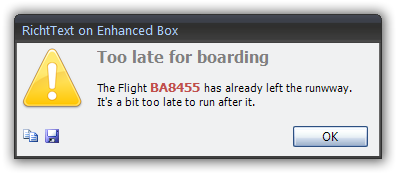
  • First and foremost, it can accept HTML formatting so you can create truly beautiful messages
  • It has options to copy the message (great for reporting what errors a user receives)
  • It has an option to save the message
  • See the developers website for a full listing of features

How much does it cost?

Nothing!  No strings attached.  Simply download the zip file and copy the form and module into your database and start using it.  The zip file contains an unlocked accdb file with everything you need!

Renaud, provides numerous code examples on his site and it truly isn’t very complicated to use in the first place.  It has similar syntax to Microsoft’s website only it is much better!

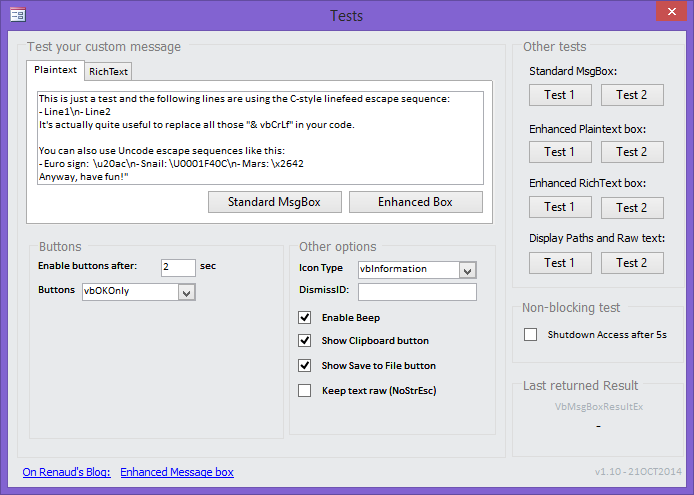
Renaud, even provides a form to test things out so you can easily see it in action and compare the result to the standard message box (as if there was any comparison).

You can also easily update your existing databases to use the Enhanced Message Box by simply performing a Find and Replace.  That’s as hard as it gets.  So check it out for yourself, you have absolutely nothing to loose!

All I can say is Thank you Renaud for this exceptional tool and thank you for sharing with us all!  It is one more way of taking any database to the next level.

Note
I have no affiliation with above mentioned website, developer, product, company … The above is an independent, unsolicited post based on my personal opinion.

htaccess Force https on Domain but not on SubDomain

I recently wanted to setup SSL on 2 of my websites.  So I purchased the SSL Certificates and performed the installation through my host’s domain portal.

My host modified my default .htaccess file by adding

#RewriteEngine On
#RewriteCond %{SERVER_PORT} 80
#RewriteRule ^(.*)$ https://DomainName.com/$1 [R=301,L]

The problem was that I had a subdomain, for personal use, on one of my domains and I did not want to force https on it since my SSL certificate was only for the main domain.  The above ReWrite rule is indiscriminant and forces https on all urls.  I contacted my host and they weren’t very helpful, so I knew I was on my own to figure this one out.

I won’t bore you with all the variations I tried (hours of Googling and trying this and that), but below was what finally worked for me to exclude a subdomain from being forced into https.

RewriteEngine On
RewriteCond %{SERVER_PORT} 80
#Exclude subdomain from rewrite rule
RewriteCond %{REQUEST_URI} !^/SubDomainName/
RewriteCond %{HTTP_HOST} !=SubDomainName.DomainName.com [NC]
#rewrite the url to force the use of https
RewriteRule ^(.*)$ https://DomainName.com/$1 [R=301,L]


So let explain the 2 critical new lines:

RewriteCond %{HTTP_HOST} !=SubDomainName.DomainName.com [NC]

This one is pretty self-explanatory, if a request is made to access SubDomainName.MyDomainName.com then you do not (!) apply the following Rewrite Rule.

RewriteCond %{REQUEST_URI} !^/SubDomainName/

This one on the other hand may not be so obvious.  My host was automatically redirecting request for

SubDomainName.DomainName.com

to

DomainName.com/SubDomainName

so I needed to add another Rewrite Condition to also exclude such a request from being forced into https.  You may not need to include this condition on how your host has things setup.


Robot.txt

One last additional tidbit.  While trying to figure out the above I came across a posting in which they stated that an exclusion for the robot.txt should be made so it does not require https.  To do so, you would add one more Rewrite Conditon

RewriteCond %{REQUEST_URI} !/robots.txt


So the final htaccess would then become

<IfModule mod_rewrite.c>
RewriteEngine On
RewriteCond %{SERVER_PORT} 80
#Exclude robot.txt from rewrite rule
RewriteCond %{REQUEST_URI} !/robots.txt
#Exclude subdomain from rewrite rule
RewriteCond %{REQUEST_URI} !^/SubDomainName/
RewriteCond %{HTTP_HOST} !=SubDomainName.DomainName.com [NC]
#rewrite the url to force the use of https
RewriteRule ^(.*)$ https://DomainName.com/$1 [R=301,L]
</IfModule>


Resources

While trying to figure this all out, I came across a few good sites, should you wish to delve deeper into the matter:

Disclaimer
Let me be explicitly clear, I am not an htaccess experts by any means.  I simply managed to piece the above together out of personal necessity.  Just because it worked for me does not guarantee it will work for you, nor should any assumptions be made that it is the best approach to the matter.

As with any post on my site, I am always open to better ways of doing things, and learning, so feel free to leave a comment if you can add constructive information to the above.

Great Access Tools – Access Shortcut (right-click) Tool

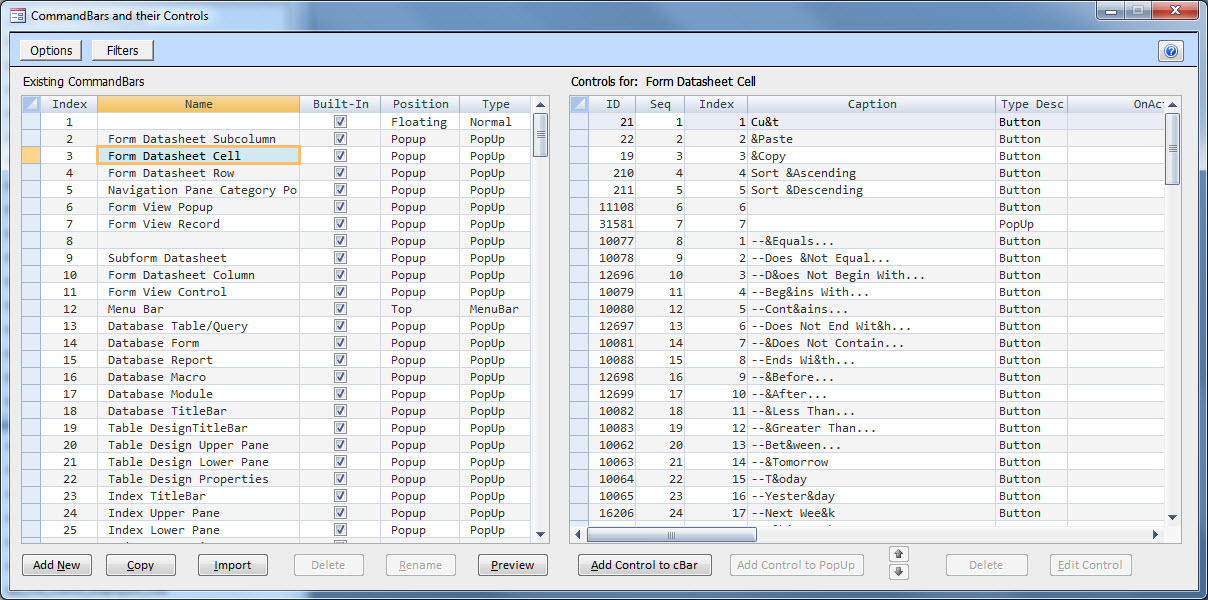
As developers our primary job is to facilitate our user’s interaction with the data. One way to provide easy access to functionalities (sorting, filtering, …) is by creating Right-Click Context Menus. Sadly, Microsoft has, in recent years, made this even more complicated than it already was and it is quite undertaking to say the least!

Thankfully, Dale Fye, fellow MS Access MVP, has created a really nice add-in, the Access Shortcut (right-click) Tool, to completely revolutionize the task of creating such context menus.

Through the use of his add-in, you simply fill in a couple menus to make selections and apply settings and the next thing you know you have fully functioning MS Access right-click context menus in your database!

Continue reading

The Access Web is Moving!

One of the oldest & best Access website’s, The Access Web is moving!

Microsoft is shutting down their hosting of the site and as such the MVPs that were maintaining the site have taken it upon themselves to save the site by moving it to another host. So the old address:

http://access.mvps.org/access/

has now been replaced by

http://theaccessweb.com/

So update your links so you never loose access to the knowledge contained.

Bonus, the new host/site responds much faster!

VBA List References

I was trying to troubleshoot a new setup with one of my clients over a year ago in which a stable database (8+ years running without any issue) suddenly would not work on the new application server on which I did not have Admin privileges to and was throwing errors which indicate Reference issues.  The problem was that I tried to run the usually suggested code to no avail.

'The following does not work properly and should not be relied upon!
Sub ListReferences()
    On Error Resume Next
    
    Dim ref As Reference
    For Each ref In Application.References
        Err.Clear
        Debug.Print ref.Name, ref.FullPath, ref.GUID, ref.Kind, ref.BuiltIn, ref.IsBroken, ref.Major, ref.Minor
        If Err.Number <> 0 Then
            Debug.Print "Error raised on reference ";
            Debug.Print ref.Name;
            Debug.Print
        End If
    Next ref
End Sub

I turned to asking my fellow MVPs for some guidance and we ended up having quite a substantial discussion and went back and forth with code variations until we perfected the following function.

Sub ListReferences()
'Authors: Dirk Goldgar
'   Contributor: Tom van Stiphout
    On Error Resume Next
    
    Dim ref As Access.Reference
    Dim strRefDescription As String
    Dim lngCount As Long
    Dim lngBrokenCount As Long
    Dim blnBroken As Boolean
    
    Debug.Print "REFERENCES"
    Debug.Print "-------------------------------------------------"
    
    For Each ref In Application.References
        blnBroken = False
        lngCount = lngCount + 1
        strRefDescription = vbNullString
        
        Err.Clear
        strRefDescription = strRefDescription & "Name: '" & ref.Name & "'"
        If Err.Number <> 0 Then
            strRefDescription = strRefDescription & "Name: " & "(error " & Err.Number & ")"
            blnBroken = True
        End If
        
        Err.Clear
        strRefDescription = strRefDescription & ", FullPath: '" & ref.FullPath & "'"
        If Err.Number <> 0 Then
            strRefDescription = strRefDescription & ", FullPath: " & "(error " & Err.Number & ")"
            blnBroken = True
        End If
        
        Err.Clear
        strRefDescription = strRefDescription & ", Guid: " & ref.GUID
        If Err.Number <> 0 Then
            strRefDescription = strRefDescription & ", Guid: " & "(error " & Err.Number & ")"
            blnBroken = True
        End If
        
        Err.Clear
        strRefDescription = strRefDescription & ", Kind: '" & ref.Kind & "'"
        If Err.Number <> 0 Then
            strRefDescription = strRefDescription & ", Kind: " & "(error " & Err.Number & ")"
            blnBroken = True
        End If
 
        Err.Clear
        strRefDescription = strRefDescription & ", BuiltIn: " & ref.BuiltIn
        If Err.Number <> 0 Then
            strRefDescription = strRefDescription & ", BuiltIn: " & "(error " & Err.Number & ")"
            blnBroken = True
        End If
        
        Err.Clear
        strRefDescription = strRefDescription & ", IsBroken: " & ref.IsBroken
        If Err.Number <> 0 Then
            strRefDescription = strRefDescription & ", IsBroken: " & "(error " & Err.Number & ")"
            blnBroken = True
        End If
        
        Err.Clear
        strRefDescription = strRefDescription & ", Major: " & ref.Major
        If Err.Number <> 0 Then
            strRefDescription = strRefDescription & ", Major: " & "(error " & Err.Number & ")"
            blnBroken = True
        End If
        
        Err.Clear
        strRefDescription = strRefDescription & ", Minor: " & ref.Minor
        If Err.Number <> 0 Then
            strRefDescription = strRefDescription & ", Minor: " & "(error " & Err.Number & ")"
            blnBroken = True
        End If
        
        If blnBroken Then
            lngBrokenCount = lngBrokenCount + 1
            strRefDescription = "*BROKEN* " & strRefDescription
        End If
        
        Debug.Print strRefDescription
        
    Next ref
    
    Debug.Print "-------------------------------------------------"
    Debug.Print lngCount & " references found, " & lngBrokenCount & " broken."

    If lngBrokenCount <> 0 Then
        MsgBox "Broken References were found in the VBA Project!", vbCritical + vbOKOnly
    End If
End Sub

Armed with this new procedure I was quickly able to identify the source of my problems, the server admins had mixed office application versions so my early binding libraries (Yes, this db was created long before I discovered the benefits of Late Binding!!!) were MISSING because I was told they were running Office 2010, when in fact they were running Access 2010 with Excel and Word 2007! Oops, I guess it slipped their minds! Then I switched everything over to Late Binding. One more reason to always used Late Binding!!!