
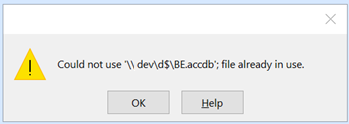
As of Patch Tuesday, Dec. 14th, 2021, there is a new Access file lock ‘bug’ as several threads have started popping up relating to error messages, such as:
This file is in use. Enter a new name or close the file that’s open in another program
Error 3050: Could not lock file.
in which longstanding databases no longer will open, can no longer be shared.
Here are a couple threads on the subject (there are many, many more, simple Google to find them):


If you are suddenly experiencing such an issues, please post a comment with details. Also, please use the Feedback command within Access itself to send as much information as possible (OS, Access build, bitness, update channel, …) to the Access Dev Team and be sure to include your e-mail address so MS can followup with you if need be!
Officially From Microsoft
Microsoft created a page on the subject, so feel free to use the link below to consult it.
What’s Been Fixed
From the above webpage, the following is how things stand as of 2022-02-04:
Microsoft has finally started releasing another update to fix what the first fix did not fix! As it stands right now, they seem to have release a ‘proper’ fix for:
- Office 2013 (KB 5002151)
- Office 2016 (KB 5002138)
- Office LTSC 2019 (Version 1808, build 10382.20034)
- Office LTSC 2021 (Version 2108, build 14332.20216)
- Office 2016 C2R (Version 2112, build 14729.20248)
- Office 2019 Consumer (Version 2112, build 14729.20248)
- Office 2021 Consumer (Version 2112, build 14729.20248)
- Microsoft 365 Apps Current Channel (Version 2112, build 14729.20248)
- Microsoft 365 Apps Monthly Enterprise Channel (Version 2111, build 145701.20290 & Version 2110, build 14527.20364)
- Microsoft 365 Apps Semi-Annual Enterprise Channel (Preview) (Version 2108, build 14326.20738)
- Microsoft 365 Apps Semi-Annual Enterprise Channel (Version 2108, build 14326.20738)
- Microsoft 365 Apps Semi-Annual Enterprise Channel Extended (Version 2008, build 13127.21886)
It is interesting how the fixes for different versions are being released on different timelines. Makes me think of 2 & 3 tier health care system, different class of citizens. Some people get the good stuff, some get okay help and the rest of you are simply out of luck! 🙂 Tell me it isn’t so Microsoft!
DFS-N
Short file names
Mapped drives
Hard links, Junctions and Symbolic linksAccess Dev Team
So clearly some major networking issues remain to be fixed! This is why I do not understand how Microsoft has already labelled the issue as ‘Fixed’ on their official page on the matter. It isn’t fixed!!!!
So, should you be one of those lucky people that continue to experience the issue after updating to the most recent build number, then try directly linking your tables using IP based paths (eliminating all networking layers). If that still doesn’t work then your only solution remains to disable automatic updates and then rollback your installation to a previously stable build number.
There May Be More To This Story
I have had several sources now formally state, after confirming, that KB5002115 and KB5002124 both also contribute to this issue as well. So review some of the comments below
To be more specific, this was causing the database to throw a “cannot lock file” error when opening a Word template that relied on that database. KB5002099 broke it, KB5002115 breaks it too.
We blocked 5002099 on our update server, but the fact that 5002115 breaks it too has our network admin worried that whatever broke it in 5002099 may be cumulative at this point.
Which is very worrisome and very much in character from Microsoft…Shaun -- Coments below
or consult Access – did we get hit with another bad update?
Here’s the response I received from Microsoft on the subject, so hopefully it may help a few of you out there:
The full fix for 2013/2016 MSI will be released in the Windows Update catalog in the February update (probably February 1st), but there will be an update available in the download center before then (customers can contact customer support to get the link for this update when it is available).
So you may wish to keeps your eyes open for these 2 extra updates as well until Microsoft properly fixes the issue.
Other Side Effects Of This Bug
Be forewarned that other issues have now surfaced caused by this same bug. Many people are reporting that the OpenDatabase method no longer works and also reports an Error 3050: Cannot lock file. So the same issues apply to automation as well, sadly.
For those of you suffering from this issue through automation, you may like to look over Mike Wolfe’s latest article in which he provides an untested potential workaround based on a discussion we had with Shane Groff of the Access Dev Team.
A Little Back History
The issue has now officially been deemed a bug caused by some of Patch Tuesday’s security updates, specifically:
We are working on a fix, and will deliver it as quickly as possible.Shane Groff - Access Dev Team
- KB5002104 for Office 2013
- KB5002099 for Office 2016
- Office 2019 Version 1808, build 10381.20020 revert to 10380.20037
- Office LTSC 2021 Version 2108, build 14332.20204 revert to 14332.20176
and for Microsoft365 users, the build numbers of concern are:
- Current Channel Version 2111, build 14701.20248 revert to 14701.20226
- Monthly Enterprise Channel Version 2110, build 14527.20340 revert to 14430.20342
- Monthly Enterprise Channel Version 2109, build 14430.20380 revert to 14430.20342
- Semi-Annual Enterprise Channel (Preview) Version 2108, build 14326.20692 revert to 14326.20600
- Semi-Annual Enterprise Channel Version 2102, build 13801.21086 revert to 13801.21050
- Semi-Annual Enterprise Channel Version 2008, build 13127.21842 revert to 13801.21050
I’ve added what build no you should try reverting to so as to save you the time of figuring it out, but you can also consults the links below for complete listing of all historical build numbers.
So uninstall these and things should return to normal. Remember, once you remove the updates or rollback to a prior build no., be sure to stop all automatic updates or you will find yourself in the exact same situation very shortly!
Which PCs Need to be Rolled Back?
The version of Office installed on the machine that holds the back end database isn’t relevant, unless it is being used to open the back end database.Shane Groff - Access Dev Team
So all the PCs running Access need to be rolled back and not necessarily the servers housing the back-end, unless the server itself is also used to run Access. IMHO, rollback all your PCs, have them all running the same build and then disable updates until this all gets sorted out.
I would like to thank Shane Groff from the Access Dev Team for sharing this information so we could try and mitigate the issue as quickly as possible.
Feel free to leave me a comment below to let me know if this latest update fixes the issue for you.
As always, I will update this article as new information become available.
A Few Resources on the Subject

Updated to 14701.20262 stills does not work.
Depends on type of network shares.
Please see https://answers.microsoft.com/en-us/msoffice/forum/all/could-not-lock-file-with-access-build-1470120248/f2b26fe5-6e86-40bc-a469-464c3898df15?page=4&messageId=513bdcbf-4f15-4f75-96a2-5175795488ca
Indeed. The fix isn’t reliable! The whole thing is one more nightmare. Best option still seems to be to rollback the updates and wait for Microsoft to sort this all out. Hopefully it won’t turn into another 3+ year ‘Inconsistent State’ bug scenario! 🙁
Hi, I’ve used the MS Access Runtime 2016 version 64-bit but still the issue is there. I think it is the Windows updates caused the issue.
This is really going to blow my companies trust in Microsoft. I would expect them to prohibit the use of Microsoft databases in favor of Internet database hosting services. I hope the Microsoft Office developers understand that they are destroying the Microsoft Office name with their updates.
Sadly, in recent years, this is nothing new. As a whole, MS365 (previously Office 365) is more unstable, riddled with continuous bugs. Microsoft’s QA is non-existent and they don’t seem to either care to, or be able to address the problem. They have turned their users into guinea pigs and free QA testers and now react to bugs rather than prevent them in the first place. This is why I do a lot more web based development and have drastically pulled away from using any Microsoft technologies anymore.
We’re on the Monthly Enterprise Channel, I reverted a few pcs to 14430.20342 and that seemed to work. Then Microsoft said they fixed it, I enabled the updates, the updates were not getting picked up, so I had to run the setup.exe again to 14527.20340 to get the updates to x.20344. And only some of them updated.
The ones that didn’t, went back to the lock error. This has been pretty frustrating.
We have applications using a split database– back end on the network and front end MS Access 2016 Runtime based on an Office 2013 corporate build–all are down and unusable. This is a disaster!
Microsoft needs to roll out fix fast!
They have rolled out certain updates, it depends if you have MSI or CTR installations. AND the update doesn’t work for all situations, there are still issues even after the latest ‘fixes’. My advice remains to rollback the updates that cause this mess and wait until Microsoft properly fixes the issue.
Ditto here, same issues as listed above. My organization uses DFS and issues are not resolved. Had to roll back to previous versions.
This is killing us! Are there any KB’s related to the fixes that Microsoft has published?
Daniel thanks for the advice. Uninstalling KB5002104 for Office 2013 KB5002099 for Office 2016 seems to have fixed our problems, for now at least.
Applied kb 4484211 and 2965317 on our machine this morning and so far looks promising
Just an update for any others:
We were using version: Semi-Annual Enterprise Channel Version 2102, build 13801.21086
This update seems to have resolved our ‘lock file’ issue: Semi-Annual Enterprise Channel Version 2102, build 13801.21092
–Setup Network share via UNC, no DFS share namespace
KB2965317 definitely fixes this nightmare for the Access 2013 runtime.
We also applied KB4484211 on several of our machines this morning and it seems to work.
We applied KB4484211 on several of our machines and servers this morning and it seems to work.
I also have Microsoft Office 2019 installed on one machine. I confirmed that it works on version 1808, build 13082.20010 (64-bit) using a UNC network share.
Another MS fiasco that we sadly are forced to endure. Dec 16th after our scheduled weekly updates, all of our Access mdb/accdb applications stopped working! (Office Pro Licenses ranging from 2003, 2016, and 2019) INSTEAD OF MS RELEASING AN EMERGENCY UPDATE, we had to spend OUR valuable time, over the holidays, to find the appropriate KB’s and “MANUALLY” download and install them (Dec 29th 2 weeks after their official update release). Only Monopolies get away with releasing “UNTESTED” updates! It’s time for other competitive Database Products to come forward. Foxpro would have been welcome except MS took them over then dropped support … everyone keeps pushing SQL but like VHS vs BETA, there is at least one BETA solution that could wipe out both Access and SQL … if OpenEdge (Progress) were to enter the consumer realm there would be no looking back.
Is there any update as of today, 1/3/2022? We have users running Office Professional Suite 2019 32 bit. Does (KB4484211) work?
Thank you!
The Current Channel build was updated yesterday (January 4, 2021) to 2112 (Build 14729.20194).
https://docs.microsoft.com/en-us/officeupdates/current-channel
Has anyone tried the updated version yet?
Thank you for very much, you saved my work!
I applied KB4484211 on several of our machines this morning and it worked perfectly.
It doesn’t appear to work for me. I have an Access database I manipulate in a VBscript. I am still getting an error after the update. Judging from what I’ve read here and elsewhere, it may be because we use folder redirection.
Highly likely.
The 2112 (Build 14729.20194) fix DID NOT work for us. We are so frustrated. We have a call with Microsoft this morning.
HI Kennedy,
2112 didn’t work for me (I perhaps wouldn’t have tried it had I read your comment first :-)) – did you get any satisfaction or a solution from MS?
MS Support article just got updated claiming a fix for “DFS Namespaces, Short file names, and Mapped drives” is pending release:
https://support.microsoft.com/en-us/office/error-in-access-when-opening-a-database-on-a-network-file-share-6cbc1560-62c2-46e7-9980-d079a46f5acc
Do you know when the update is available for this issue from Microsoft?
According to Adam Rechkemmer perhaps January 11th, but no guarantees!
Taken from https://answers.microsoft.com/en-us/msoffice/forum/all/lock-file-problems-with-access-1601380121086/9cb70637-7d21-4e1e-941e-11b1c9e217c6?LastReply=true#LastReply
Today 12/Jan/2022 two more updates seems cause the same problems like the KB5002104 and KB5002099 updates. The new updates are KB5002115 and KB5002124.
Can confirm, KB5002115 broke an Access DB for one of our employees. Office 2016.
To be more specific, this was causing the database to throw a “cannot lock file” error when opening a Word template that relied on that database. KB5002099 broke it, KB5002115 breaks it too.
We blocked 5002099 on our update server, but the fact that 5002115 breaks it too has our network admin worried that whatever broke it in 5002099 may be cumulative at this point.
Which is very worrisome and very much in character from Microsoft…
We have a VDI instance on which we run both the frontend and backend in a network share. We have found that if one person is running an Access app and someone else tries to run it, they get the File in Use error AND the backend db is corrupted. The first user loses their work at that point.
The first user has to log our and we have to compact/repair before anyone (and JUST one!) can use the app again.
This is unbelievably fragile.
Looks like MS has a released a patch for most builds.
https://support.microsoft.com/en-us/office/error-in-access-when-opening-a-database-on-a-network-file-share-6cbc1560-62c2-46e7-9980-d079a46f5acc
In our environment we have tested the Semi-Annual and Current Channel builds and the DFS share path bug appears resolved.
Indeed, that is what is indicated in the article above.
What remains to be fixed: Office 2013, Office 2016 & Microsoft 365 Apps Semi-Annual Enterprise Channel Extended, from my understanding won’t see a fix until February. I’m hoping this is incorrect. That would mean 2 1/2 months with this issue. Even as it stands, it has taken a month for Microsoft to resolve it for MS365 users. They are simply lucky this happened during the holidays which lessened the blow a bit and not so many people were impacted at the time.
Glad I found this post. Started having this issue today. But I’m confused. I looked under “About Access” for me and a few co-workers who use use the database I developed. Looks like we all have the “Version 2102 (Build 13801.21092) Semi-Annual Enterprise Channel”. According to the MS support site above and posts above, that means this issue should have been resolved with the version number we currently have installed, right? So why is this still happening?? Hoping someone has on here has some answers!!
Although, when I click the “About Access” button, and it brings up the “About Access” pop-up window with license info, etc. It says it’s version 16.0.13801.21072. Those last two digits don’t match the version number on the Account page. More confusion! Can someone explain??
Side Note: I also noticed this problem at the same time. Seems it’s all related. This post below even refers back to this page:
https://docs.microsoft.com/en-us/answers/questions/667760/laccdb-file-0kb-in-a-network-folder.html
I’m on the Semi Annual Enterprise. On December 16, Office updated to 13801.21092 which fixed the problems introduced in 13801.21086 (for me, anyway). Then a few weeks ago, Office updated to 14326.20738 which was still fine and everything has been working well.
But on January 22, I notice that Office has updated again…going BACK to 13801.21092. Does anybody know what is going on now? Why the regression?
Manually force it back to 14326.20738, turn off automatic updates if need be.
OMG, what a nightmare!
That’s an understatement. Another totally crippling bug which took a little less than a month for Microsoft to address properly for most users, yet a few people (those using Access 2013, 2016) still don’t have a fix and have to wait until February!
Be happy you run entirely on ‘out of support’ versions and didn’t get impacted by this.
Maybe it will be useful. Little powershell script to remove Office Updates KB5002104, KB5002099 on your MS Office 2013&2016 x32-x64 configurations while waiting to MS release
https://github.com/agapovmax/powershell/blob/a4559b3fdf2481b79ab9c02bdff3650a7dc36628/Remove-OfficeKB.ps1
Well, I’m glad and sad that it’s not just me. This broke my front/back end setup and now multiple users can’t connect to the back end at the same time. Thanks for the post, guess we’ll just have to wait for an update that works. Being that they still haven’t fixed the print nightmare issue yet, I doubt the Microsoft staff will get around to it anytime soon.
Since the problematic december update of MS Access I appear have other problems with an MS Access application connected to a SQL server cloud database: application refusing to quit after performing some data operations. Anybody else facing this kind of problem?
Yes. MS365. Access window closes, but the process remains on the Background Processes list in Task Manager. Next attempted run of a database creates a lock file, but the Access window does not open. Can’t delete the lock file unless the Access process is manually ended via Task Manager
Looks like late in the day on Feb. 21, they released what is supposed to be the final remaining patches for this issue (for Office 2013 and Office 2016 versions). We’ll be trying KB5002138 (for Access 2016 perpetual (.msi installer) version) this week.
They updated the patch grid on this site:
https://support.microsoft.com/en-us/office/error-in-access-when-opening-a-database-on-a-network-file-share-6cbc1560-62c2-46e7-9980-d079a46f5acc
Link for KB5002138 takes you here:
https://support.microsoft.com/en-us/topic/february-1-2022-update-for-office-2016-kb5002138-a759a57a-f76b-45ea-91d6-d48e0a78765f
For us, it does appear that the early patches that were listed as final for the Office 365 apps versions resolved our problems on workstations running that software (Semi-Annual Enterprise (preview) channel and Semi-Annual Enterprise channel), so we are cautiously optimistic that this will do the same for our Citrix desktops running 2016.
Best of luck, everyone!
@Gert
Same thing for me with one PC with Office 365 (v2201 build 14827.20158) :
* Open frontend access file
* Close it (alt F4 or docmd.quit or whatever)
>> Access is still here in task manager and there is a lock file i can’t delete until I kill the task.
>> With another mdb, after open/close it, I can see an empty Access window i can’t close without task manager.
Can confirm KB5002138 finally fixes the issue for all namespaces.
i have tested the KB5002138, for Office 2016 on a few users and it does fix the issue for DFS paths. Yihaaa. This has been a crazy ride for the clients.
@Xavier I also have a new lock file issue starting today with Office 2016 build 14827.20028. This does not relate to network drives, but to a database on a local drive.
There is erratic performance in the database, with some sub routines failing to execute. When the database is closed, the local lock file does not close, and Access remains running in task manager. Only way to get back in is to end task, then delete the lock file.
Rolling back to 14729.20260 fixes this right away.
FYI KT there is a new bug, details here:
https://support.microsoft.com/en-us/office/access-is-unable-to-close-and-leaves-lockfile-active-b2dce32b-b8b0-41f1-ba40-7876e524d9da
Similar problem new bug
Indeed, I posted about that several days ago: https://www.devhut.net/another-access-bug-cannot-open-any-more-databases/
Calamity Microsoft is ruining our business with this problem! Costing time and money!
Is there any updated ETA on the Enterprise fix release?
I can’t revert back to a prior version of Access, so this is painful to wait for a solution.
Nope, no news whatsoever. The Dev Team rarely informs us anyways. Like you, we just keep testing and waiting for public reports. The whole situation is ridiculous. Why can’t they put a simple ETA!
Paul,
I reached out the the Access Dev Team and this is what I was told:
Hi Daniel
Thanks for checking on this, appreciate it!
My version is 2102 (Build 13801.21106), so I guess I have to wait for my IS area to roll out the update as I don’t have security rights to upgrade or downgrade.
I tried the other fix that I saw noted that has to do with the Trust Centre, but I can’t add any new folders or change anything really other then selecting “sub folders of this location are also trusted”.
Glad I came across your posts, super helpful to know what’s going on (from a newbie’s perspective).
Paul
Thanks for checking into this and getting back to me!
Now, unfortunately I just have to wait until our IT area decides to roll out the changes to the users.
Paul
Perhaps put in a ticket/give them a call? For such bugs, if IT is made aware that a patch has been released, they normally will be receptive to pushing it out as it solve the headaches for them!
Hi Daniel,
Not sure if it bears any relation to the issue, but we just found that one database in a path with spaces and non-aplhanumeric characters (d:/abc & def/access.accdb) gives a “file in user” error, and one with a path with no spaces (d:/abc/def/access.accdb), is fully multi-user.
We moved the troublesome db to another “simple” path, and voila – it works now.
Hope this helps someone else.