I previously reported issues with V2206 (actually the version varies depending on your Update Channel! just to add complexity to the mess) breaking MDEs/ACCDEs at startup, you can read all about it in my article
Access - MDEs & ACCDEs Breaking
As reported to me earlier in the day (by Mark D) and now confirmed by multiple sources, it would seem we have another bug to add to our long list impacting MDEs & ACCDEs . You know you’ve been impacted by this issue if you receive the following error message: The expression on open you…
Continue reading →
I’ve also received reports and seen in various forums that things are even worse, that 2206 breaks other features such as:
DoCmd.TransferText
DoCmd.OutputTo
…
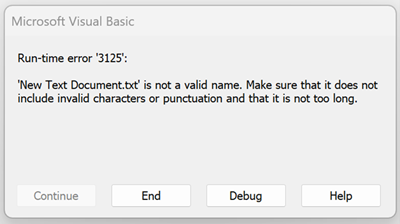
Reporting an error along the lines of:
Runtime error ‘3125’:
‘FileName’ is not a valid name. Make sure that it does not include invalid characters and it is not too long.
Here’s are a few of the different threads on the issues surfacing with V2206:
MS Access VBA code, DoCmd.TransferText, acImportDelim ... failing
Within the last week, the following MS Access VBA function is failing on multiple workstations having Windows 10 Pro, and with any (32-bit) version of MS Access 2016 through 2021...
Windows or Office 365 Updates on 7/12/22 Introduced Error with TransferText in vba for Access
After the above noted updates I have received several reports of Access error 3125. I have traced this issue to a saved import specification. Below is an example of the error when using an import specification and an example without the import specification that does not error out. The original…
MSAccess - Issues with KB5002112/KB5002121 (VBE7.dll).
MS Access runtime (2013 & 2016) the update to the VBE7.dll (now V7.1.11.23) lead to broken references and an inability for our start-up functions to run and main form to load.
We would see a message on screen saying "The expression On Open you entered as the event property setting produced the following error: Requested type library or wizard is not a VBA project."
Access with breaking changes on Version 2206 (Recordset2.Fields returns DAO.Field3 instead of DAO.Field2) - Error 13
It looks like Microsoft introduced a breaking change with version 2206! 🙁
If you had code like
Dim rs as DAO.Recordset2
Dim fld as DAO.Field2 For Each fld in rs.Fields ’<- Code will break ...
Microsoft Access Attachment Recordset
I have had a Microsoft Access application working for many years. However today the following code has stopped working. Dim Recordset2 As DAO.Recordset2 Dim fieldAttachment As DAO.Field2
WARNING: Do NOT Declare DAO Fields As Field2, Field3, etc.
While declaring DAO Field objects as Field2 will get you additional IntelliSense, it comes at the risk of breaking working code when MS releases a new Field type.
Access - Bug - Report Borders Not Showing
Yep, one more to add to the long list Microsoft Access bugs! The Problem As reported: We seem to have a new bug that has surfaced in version 2206 (build 15330.20196) in which reports don’t seem to be properly rendering. Fixed Microsoft has supposedly fixed the issue by flipping flags at their end. So…
Continue reading →
Basically, from what I know and have read regarding Office V2206 is that it is another disaster, and not just for Access but Office as a whole, so STAY AWAY!
Revert your build back to V2205 and wait for Microsoft to cleanup their latest mess. For MS 2013, 2016, … uninstall the KB updates and wait.
I’ve said it before and I’ll say it again, do not use automatic updates, do not use the Current Update Channel for MS365. Sadly, Microsoft’s update process is completely unstable and you need to wait a round or two before applying updates.
Yes, it’s a pain to manually manage things, but it’s an even bigger pain to have employees on downtime because Office/Access no longer works!
Microsoft?
Some of these have been confirmed days/weeks ago, yet still are nowhere to be found on the Fixes and workarounds page:
Fixes or workarounds for recent issues in Access
Fixes or workarounds for recent issues in Access
which always brings me back to what is the purpose of the page exactly if not to help people searching for help with bugs?!
This is why I had to create a post on the subject:
Access - Purpose of the 'Fixes or workarounds' Page
I ask you: What is the purpose of the Microsoft Access ‘Fixes or workarounds for recent issues in Access’ webpage/portal?
Such a missed opportunity, time and time again.
Update 2022-08-02
Microsoft has finally published a ‘Fixes’ pages regarding the DoCmd.TransferText issue (only took them 3 weeks?!):
Error when trying to use DoCmd.TransferText with an export specification
When using DoCmd.TransferText with an export specification, you may receive an error message that says that the file has an invalid name.





Sad to say we do not have anything to replace Access. Like many others, Access is the ONLY reason I remain on the Windows platform. I would leave in a heartbeat if there was another Access on Linux or Mac. I just have invested too much in Access DB’s for myself and others I have done work for.
If anyone can make suggestions for something other than Access for very small business’ and not Microsoft products, I have an open ear.
I made the move to PHP (which can use any RDMS as its back-end) for the front-end interface. The clients I have done development, and conversions of their Access database have been very happy.
There are a number of advantages, amongst them things like:
Get a good PHP framework, dig in and you’ll be able to develop some truly beautiful applications!
Other sites list a number of PHP frameworks to choose from. What do you use and why? Would you recommend one or a few that are out there?
The are many good frameworks out there:
Zend
CakePHP
Laravel
Yii
CodeIgniter
Symfony
…
Personally, I’ve taken a liking to Yii.
All of those are good advantages, but I’m puzzled by one thing… why PHP? I assume people who choose to use Access for creating applications are creating applications that involve data analytics of some type. Wouldn’t Python be a much better fit in your solution stack than PHP given its preeminent role nowadays in data analysis/data science/machine learning? To the best of my knowledge PHP was never designed with data analysis in mind and I have yet to encounter it being used for such in the wild.
It’s always a question of choices. Python is great, but requires installation which can be an issue in many environments.
I also wasn’t impressed by the documentation as I couldn’t easily find anything regarding installation/setup on their own site, and ended Googling to find what I was looking for. So when I can’t even find a high level overview of setup, I’m not too inclined to take a dive into the language.
Add to that the fact that I was a little familiar with PHP when I was researching for a new development avenue.
PHP, in my case, was already ready to go as I already had a hosting plan and development VM with it setup.
As for analytics, that done on the back-end, so separate from PHP and then I can use various libraries for displaying them. There are countless choices here as well, so I’m not backed into any corner as to what I can and cannot do. Furthermore, there are Analytic libraries available, but I have never needed any for any of the systems I’ve created so far. As I said, simple SQL typically gets me all the information and then it’s just a question of displaying it which is trivial in PHP/HTML/JS.
Also, PHP allows me to do more than just database development as it is highly flexible.
I wanted a single environment which I could control, PHP allows that. It may not be everyone’s cup of tea, but it has served me very well so far.
Please see https://jam-py.com/. Its free also, unlike PHP it’s a RAD db development tool.
Thank you for sharing. Seems interesting.
I see it relies on Python, amongst other things, so there is installation to perform. I will look into it a bit more in the coming days. I want to understand how it gets deployed/hosted and most importantly, security!