
As reported to me earlier in the day (by Mark D) and now confirmed by multiple sources, it would seem we have another bug to add to our long list impacting MDEs & ACCDEs .
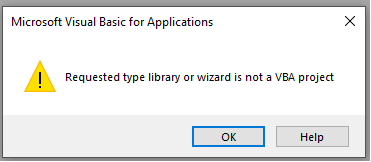
You know you’ve been impacted by this issue if you receive the following error message:
The expression on open you entered as the event property setting produced the following error. Requested type library or wizard is not a VBA project.
another report presented the error as being:
The expression you entered as the event property setting produced the following error:
The expression may not result in the name of a macro, the name of a user-defined function, or [Event Procedure]. There may have been an error evaluating the function, event, or macro.
This appears to impact:
- MS365 all versions (July 12, 2022 update) – It is widespread and the build varies depending on the Update Channel you are using
- KB5002121 for Office 2013
- KB5002112 for Office 2016
Workaround
The only known workaround at this point in time is to uninstall the faulty KBs or revert your build to a prior ‘stable’ build.
Where’s Microsoft in all of This?
I notified them earlier this morning of the issue, when I first got wind of it.
2022-07-15 – We now actually have a Fixes and Workaround page on the subject! You can find all the impacted MS365 build numbers.
Forum Discussions on the Subject
If you’re a sucker for punishment and want to see what others are saying on the subject feel free to look over:
This issue has also been reported to us on monthly channel (Version 2205 Build 15225.20356) and semi-annual (Version 2202 Build 14931.20604).
Since the update we get the following error in our application at startup.


These three lines in a batch file will re-install 2205. It MUST be run as Admin.
The 2nd line turns off future update to Office
The 3rd install 2205
cd C:\Program Files\Common Files\Microsoft Shared\ClickToRun
OfficeC2RClient.exe /ChangeSetting updatesEnabled=False 16
officec2rclient.exe /update user updatetoversion=16.0.15225.20288
Hi, I ran that on one of my client’s PCs and it fixed the issue.
I tried to run it on another client’s PC, it appeared to run the batch file but it did not initiate the rollback.
Do you have any idea why that may be (I am wondering if it’s a policy thing that their IT company have imposed to stop people running code in specific folders?)
Yes, IT policies can’t stop you from being able to make such changes.
Also, the recent bug has different builds depending on the Update Channel, so you can’t revert to the same build for all. You need to lookup your Update Channel’s updates, and revert appropriately.
Same here on 2019
The same code for Office 2019 (broken version is 16.0.10388.20027)
cd ‘C:\Program Files\Common Files\Microsoft Shared\ClickToRun\’
.\OfficeC2RClient.exe /ChangeSetting updatesEnabled=False 16
.\officec2rclient.exe /update user updatetoversion=16.0.10386.20017
Worked perfect here. Thanks a lot!
We now have a client with a server with o365 on Semi-annual enterprise channel who restarted their server and can no longer open Access.
They are on 2202 14931.20604 Click-to-run which the MS site shows as last updated 12 July. The restart must have installed it.
Does anyone know how to revert back to 2201?