This is going to be short and sweet, for now. I started writing this after hitting one too many issues while working with the QuickBooks REST API in PHP. Instead of losing track of them, or convincing myself I imagined them, I decided to jot everything down as I go.
What follows is not a polished article yet. It is more of a running list of oddities, limitations, and outright frustrations I have encountered in both the API and the Web UI. Eventually, I will clean this up and turn it into something more structured, but for now, this is the raw version.
REST API
Initial Setup and oAuth2 Process
It was super simple to initially get functional in Development mode (great for proof of concept and getting your feet wet), but switching to Production was a challenge to say the least!. QuickBooks should SERIOUSLY revise the setup to get into production mode. When I compare it to say, XERO, their approach is just complicated.
So it’s easy to be up and running in development mode with a sandbox sample company, but to switch into production, go through their ‘Compliance’ and then link up a live company needs some love. Yes, now that I’ve done it (more than once), I could redo it, but for a novice it was painful to get through with many unknowns. When compared to other APIs, including other financial APIs, QB’s is overcomplexified for absolutely no reason. You almost feel like you’re having a proctology exam!
Personally, I believe it should be rebuilt from the ground up and greatly simplified.
CustomField
QuickBooks allows six CustomField entries to be created through the Web UI. However, when working through the REST API, only three of those fields are accessible or can be set when creating objects such as an Invoice. This effectively leaves the remaining three fields unusable when working exclusively via the API.
Missing Attributes
Along the same lines as the CustomField limitations, there are attributes available in the QuickBooks Online web UI that are inexplicably missing from the REST API. Two notable examples are Vendor Notes and a Bill’s ‘Status’ (not sure what the attribute is really called). While note-related fields are exposed for other entities, Vendor Notes are completely inaccessible via the API. Similarly, Bill status, whether “For Review,” “Unpaid,” or “Paid,” cannot be set programmatically and can only be configured through the web UI.
These gaps create unnecessary functional limitations and force fragile workarounds for data that is clearly supported by the platform but not exposed to developers. The inconsistency is puzzling and significantly impedes the ability to fully automate workflows that rely on vendor metadata and billing states, making this a serious issue for both my project and my client.
Inconsistencies in Naming
Throughout the data model, attribute naming generally follows a consistent singular-tense convention (e.g., PrivateNote, Customer, Item). However, there are notable exceptions that break this pattern, such as Customer Notes. These inconsistencies may seem minor, but they introduce unnecessary cognitive overhead for developers and increase the likelihood of mistakes when working across multiple endpoints. A more consistent and predictable naming strategy would significantly improve the developer experience.
SalesOrder
Sales Orders cannot be interacted with in any way through the REST API. There is no ability to create, read, update, or query them, making automation or integration involving Sales Orders impossible using the API alone.
Item
I have encountered a strange behavior when creating Item entries through the API. Once created, these Items are immediately available for Invoicing and Reporting. However, attempting to view or edit them through the Web interface often requires waiting thirty minutes or more, and sometimes several hours, before they appear.
I raised this issue with Intuit and was told this should not be happening, yet I have experienced it repeatedly.
When an Item is created via the API, an Item Id is returned and can be used reliably when working with that Item through PHP. However, that same Id cannot be used in the Web UI. Items accessed through the UI appear to have a different identifier, and there seems to be no way to cross reference the two via the REST API.
As a result, it is impossible to generate a direct HTML link that navigates from a custom view to the corresponding Item in the Web UI. This is something that works without issue for Invoices, Bills, Vendors, and Customers. So far, this problem appears to be isolated to Item entries.
Documentation – QuickBooks API Reference
Similarly to the QuickBooks FAQ (below), I began by skimming through the API Reference primarily to identify the correct attribute names for me to use in my coding. However, as I’ve started reading more closely and following the internal links provided in the support documentation, I’m finding an increasing number of errors and broken links leading to ‘Bad Request’ or ‘We looked everywhere but couldn’t find the page’ pages.
Furthermore, I have found the documentation to be disorganized and incomplete at times, which creates friction for developers. Attributes are not listed alphabetically, why?!, making it occasionally difficult to locate the information needed. More importantly, critical details about some entities are sometimes missing.
For example, in the Invoice Attribute, the CustomField object lists the StringValue attribute as a StringType, but the documentation never specifies the maximum length of the field. After some testing and digging online, I eventually found a discussion noting that the field can hold a maximum of 30 characters which confirmed what I was seeing in my application. It is unclear why such fundamental information like this is not included in the official documentation.
These sporadic gaps force developers to spend extra time testing, guessing, or searching forums, which slows implementation and increases the risk of errors. While the documentation is helpful in many cases, these inconsistencies make fully relying on it challenging.
Web UI
Language
One really weird occurrence was that my interface switched language randomly on its own one day! I had been on the system and the interface was English, came back an hour later and it was suddenly French.
Figuring out how to switch back the UI language was another surprising challenge because searches for ‘Language’, ‘Switch Language’, … and nothing was returned. It took a surprising amount of time to locate the setting required to change it back to English.
The path to this setting is as follows:
Settings (the gear icon) -> YOUR COMPANY -> Accounts and Setting -> Advanced -> Language (midway down the page)
You’ve got to also ask yourself why this is a COMPANY setting and not a personal PROFILE setting?!
Also, while in the French interface, I did notice gaps in the translations where English still happened to appear.
More concerning however was after switching the language as another test, I could not longer return it back to English and get and error stating it is locked by me?!

and the error message is in English even though the interface was currently in French. Making this even more interesting is that I only had one instance of QuickBooks going, so it was impossible what was being reported, yet it blocked me from being able to change the setting. Even logging out and back in did not resolve the issue.
Missing Translations
Here’s another example of language oddities.
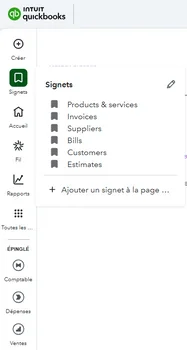
Notice the items in the Signets are all listed in English even though the Interface is French.
There are other instances of localization issues, not many, but they do exist.
Side Menu Expand and Collapse
One ongoing annoyance and consistent waste of time is the behavior of the side menu expand and collapse toggles. When clicking the toggle icon to expand a menu section, nothing happens the first time. The icon flips as though it expanded, but the menu remains collapsed.
Clicking the icon a second time causes it to flip back to its original state, even though it never actually expanded. Clicking it a third time finally expands the menu correctly.

Once this sequence has occurred, that menu section works as expected until navigating to another page. After that, the same behavior repeats.
I should specify that the speed of clicking has no impact here. I know that in the gif above it appears like I’m clicking quickly and some might link that to being the issue, but it makes no difference if I wait 1-2-5-10 seconds between clicks. It truly is a bug.
I was informed by Intuit that QuickBooks Online is best viewed using Google Chrome. However, I do not have Chrome installed, nor should I be required to. A modern web application should function reliably across all major browsers, be cross-browser compatible, without forcing users to adopt a specific one. This is basic web development 101. That said, I tested with my daughter’s device which has Chrome and the menu does work properly there, proving it is indeed a compatibility/coding issue.
Another oddity I discovered while doing some testing is this issue did not occur when I was in French localization?!
Documentation – QuickBooks FAQ Help File
I have already identified and reported an error in the documentation related to switching company files. This is a basic and critical operation, and it should never have been documented incorrectly.
At this point, I am waiting to see whether the issue is corrected and how long it takes to fix something that should be very straightforward.
An AI Assistant Like All Other AI
While working through development, I used the Web UI to verify that my code was behaving as expected. Along the way, I decided to try the built-in AI Assistant, hoping it could help point me in the right direction. Unfortunately, that experiment didn’t end well.
At one point, I simply asked how to report a bug. I tried multiple variations of the question, rephrased it in different ways, and experimented with different prompts. No matter what I asked, the assistant couldn’t direct me to the correct page, location, or help resource.
As with most AI tools, if Intuit didn’t train their AI with such information, it becomes effectively useless. Instead of saving time, it ends up costing more leaving you digging for answers on your own after the AI has already led you in circles. That was the case here and I haven’t tried it again since. I turn towards online searches rather than use their AI ‘help’.
New Web Interface vs. Legacy Interface
By default, QuickBooks now places users into its newer Web UI experience. During testing, however, we repeatedly encountered bugs and inconsistent behavior that directly interfered with both day-to-day usage and development validation. These were not edge cases — they were frequent enough to materially slow progress and introduce uncertainty when verifying whether issues originated from our code or from the UI itself.
As a result, we ultimately reverted back to the legacy (older) interface, after which many of the issues we had been fighting either disappeared entirely or became far less frequent. Stability improved, UI behavior became more predictable, and basic navigation stopped feeling like a moving target.
Given this experience, I would strongly recommend that anyone beginning QuickBooks development or onboarding a new company immediately switch back to the legacy interface before doing any serious testing or validation. The newer interface may represent the future direction of the product, but in its current state it feels unfinished and insufficiently hardened for real-world use — especially when accuracy and consistency matter.
This also reinforces a broader concern: when the Web UI itself is in flux and exhibiting regressions, it becomes significantly harder to distinguish between REST API limitations, UI bugs, and integration errors. That uncertainty alone is reason enough to favor the more stable legacy interface until the newer version matures.
A Few Final Thoughts
Please don’t take the above as an expression of complete dissatisfaction with QuickBooks. Are there inconsistencies and areas that could be improved? Absolutely! Is there a disconnect between the platform and the REST API, most certainly!
I strongly believe that anything exposed in the UI should also be fully accessible through the REST API. Unfortunately, that isn’t always the case with the QuickBooks REST API. While it appears that the vast majority of features have been ported over, the remaining gaps can be particularly painful when they affect functionality a project critically depends on. For example, allowing multiple CustomFields but limiting access to only three feels arbitrary, as does exposing the Note field across most entities while excluding it for Vendor. I’d genuinely like to understand the business or technical reasoning behind these limitations.
I also get the sense that the QuickBooks Online UI is under continuous development, with the REST API effectively playing catch-up. While I don’t have any insight into QuickBooks’ internal processes, I’m hopeful that the issues I’ve encountered are a byproduct of this evolution and will be addressed over time as the API continues to mature.
How does it compare to XERO which is my other major comparison point here? They are comparable, but I do believe from a development standpoint XERO edges out QuickBooks. For my needs, I never hit any walls with XERO where I couldn’t access everything I needed to automate like I have with QuickBooks. I never needed to reach out to XERO about issues and/or limitations in being able to automate any aspects I needed to. I just get the feeling QuickBooks in unfinished, unpolished; a work in progress. That isn’t to say XERO doesn’t have its own set of issues. XERO certainly has issues with multi-currency and their reporting is not as advanced as QuickBooks.
Since this is my first venture into QuickBooks REST API development I am interested to see exactly how responsive to feedback & bug reporting and how much native development occurs on QuickBooks side to push out fixes and new features (maybe SalesOrder, CustomField, …). I took a very brief look at the GIT repo. and from what I saw I believe that they seem to output 2 updates a year. So that isn’t the best news for me and seeing fixes to any of these issues in the near future.
QuickBooks has been a major player in the accounting space for many years, which naturally sets a high bar. Given that, I was surprised to encounter several gaps in the REST API, particularly from a company of this scale and experience.
Lastly, I will add, that based on several weeks of advanced testing, my client decided not to move forward with QuickBooks and has cancelled the entire migration project because of the limitations QB presents and the overall impact these would have on their daily operations.
All of this to say, if you’re interested in QuickBooks Online, I’d urge you to carefully do your homework, test it out for yourself before blindly diving head first.
As for me, this was a great learning experience and who knows, perhaps we’ll revisit QuickBooks in a year or two to see if they addressed any of these issues.